
docEdge DMS: In-Depth Review from Real-World Use
A practical, user-focused overview of docEdge DMS covering features, strengths, limitations, and real adoption lessons.
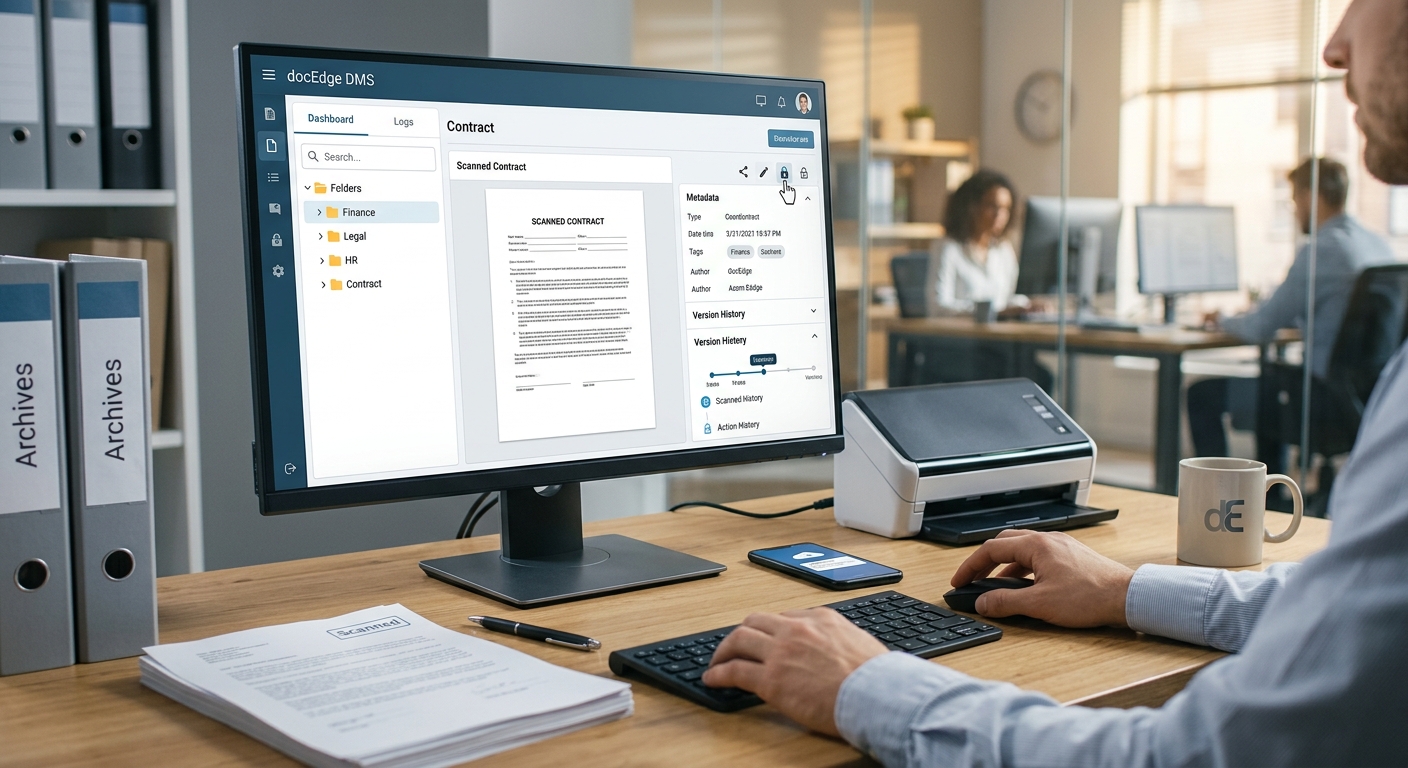
docEdge DMS is a document management platform aimed at organizations that want to move away from shared network drives and paper‑heavy workflows toward a more structured, searchable, and auditable approach to information. Based on user feedback and market positioning, the product targets mid‑size to large businesses that need tight control over documents, compliance, and collaboration.
This article synthesizes insights from verified user reviews, official product information, and best practices in document management to help you decide whether docEdge DMS is a good fit for your organization.
What docEdge DMS Is Designed to Do
At its core, docEdge DMS is a centralized repository where documents can be captured, classified, secured, and routed through business workflows. Like other document management systems (DMS), its goal is to ensure that information is:
- Easy to store and retrieve when needed
- Protected through access controls and audit trails
- Available to teams through sharing and collaboration tools
- Handled in a way that supports regulations and compliance
The general value proposition aligns with definitions from industry and regulatory bodies that highlight the importance of digital records, structured storage, and lifecycle management for organizational accountability and efficiency.1,2
Core Capabilities Highlighted by Users
While the product has many features, certain capabilities repeatedly stand out in user reviews as particularly valuable.
1. Document Capture and Digitization
Organizations often begin with a large backlog of physical and unstructured digital documents. docEdge DMS supports:
- Scanning integration with common office scanners
- Optical Character Recognition (OCR) to convert images into searchable text
- Bulk upload of existing digital files (PDF, Word, Excel, and more)
These capabilities are essential for creating a usable digital archive. OCR, in particular, turns static scans into content that can be indexed and searched, which aligns with recommended practices for electronic records management.1
2. Classification, Indexing, and Search
Once documents enter the system, docEdge DMS enables teams to tag and structure them. User feedback often emphasizes:
- Custom metadata fields (e.g., customer name, contract ID, department)
- Tagging and categorization for flexible grouping
- Advanced search across metadata and content
For document‑heavy organizations, classification is what prevents the system from turning into another cluttered file share. Thoughtfully designed taxonomies and metadata improve efficiency and alignment with governance frameworks.2
3. Access Controls and Security
Information governance frameworks stress the importance of controlling who can see or edit particular records.2 docEdge DMS supports role‑based permissions and granular access controls, allowing administrators to define:
- User and group roles (e.g., view‑only, editor, administrator)
- Folder‑ and document‑level privileges
- Audit logs that show who accessed or changed a file
Users often mention this as a key benefit for legal, finance, HR, and other sensitive departments where privacy and compliance are critical.
4. Workflow and Process Automation
Beyond storage, docEdge DMS is positioned as a tool for streamlining document‑centric processes. Typical workflows include:
- Approval chains for contracts, invoices, and internal forms
- Routing rules based on metadata (e.g., invoice amount or region)
- Notifications and reminders when actions are required
Automating routine steps can reduce cycle times and errors, a benefit often observed in organizations that adopt digital workflows for records and processes.3
5. Collaboration and File Sharing
docEdge DMS offers capabilities to share documents securely both within and, in some cases, outside the organization. Users often highlight:
- Version control that avoids conflicting edits
- Check‑in/check‑out mechanisms to manage simultaneous work
- Secure links or controlled exports for external stakeholders
These features help organizations move away from email attachments and uncontrolled copies, which are known to create version confusion and increase security risks.
Who Typically Uses docEdge DMS?
Based on reviews and comparisons, docEdge DMS is most often adopted by document‑intensive organizations such as:
- Large enterprises with multiple departments and locations
- Professional services firms (legal, accounting, consulting)
- Manufacturing and engineering companies handling technical documentation
- Financial services teams managing contracts, statements, and records
These organizations typically need not only storage but proven controls for versioning, traceability, and compliance with internal and external requirements.
User-Reported Strengths of docEdge DMS
Recurring themes in user reviews paint a consistent picture of where docEdge DMS performs well.
High Marks for Reliability and Stability
Many users report that the platform is stable once implemented, with minimal downtime and predictable performance. This aligns with expectations for enterprise systems, where service disruptions can impact business continuity.
Strong Organizational Features
Users often praise the ability to structure documents in a logical way that matches their business. Useful aspects include:
- Configurable folder hierarchies
- Rich metadata and tagging
- Saved searches and filters for frequent queries
When properly configured, these tools allow employees to locate information quickly, supporting guidance from information management standards that emphasize fast retrieval and reduced redundancy.1
Security and Control Over Sensitive Information
Reviewers repeatedly highlight the confidence they gain from knowing documents are properly protected. Key perceived benefits are:
- Reduced risk of accidental exposure via shared drives
- Clear audit trails of who viewed or changed documents
- Centralized control for records managers and IT
These features support broader organizational obligations around privacy, security, and accountability.
Responsive Vendor Support
Many users describe vendor support as responsive and helpful, especially during implementation and configuration. Faster support can be crucial when a DMS is used across departments and issues can affect many users at once.
Limitations and Common Pain Points
Even satisfied users point out limitations and situations where docEdge DMS may not be ideal. Understanding these helps set realistic expectations.
Learning Curve for Non-Technical Users
As with most enterprise‑grade DMS platforms, users occasionally report an initial learning curve. Challenges include:
- Understanding the metadata model and where to file documents
- Adapting to check‑in/check‑out behavior if they are used to file shares
- Navigating configuration‑heavy interfaces for administrators
A structured onboarding plan, training, and clear internal guidelines can mitigate these issues.
Customization Complexity
While flexibility is a strength, some reviewers note that heavy customization—especially of workflows—can require significant time and support. Over‑complex configuration can lead to maintenance overhead and confusion for end users.
Organizations that take a phased approach and start with simpler workflows often report smoother adoption.
Integration Scope vs. Expectations
docEdge DMS can integrate with other tools, but users sometimes find that desired integrations require additional configuration or custom work. Before implementation, teams should clarify:
- Which line‑of‑business systems (ERP, CRM, HRIS) need to connect
- Whether existing APIs or connectors meet their needs
- What level of single sign‑on or identity management is required
Fit for Small, Simple Use Cases
Organizations with very simple document storage needs (e.g., basic shared drives and limited compliance requirements) may find docEdge DMS more capable—and therefore more complex—than necessary. In such cases, lighter tools or cloud file storage may meet requirements at lower cost and complexity.
How docEdge DMS Compares Conceptually to Other DMS Tools
On comparison platforms, docEdge DMS frequently appears alongside well‑known document management and enterprise content management solutions. While each product differs, there are general themes in how docEdge DMS is positioned:
| Aspect | docEdge DMS | Typical Alternative DMS |
|---|---|---|
| Target organizations | Mid‑size to large, document‑intensive teams | Ranges from small businesses to global enterprises |
| Primary focus | Structured storage, workflow, and compliance | Some prioritize simple file sync; others deep ECM |
| Deployment expectation | Guided, with configuration and training | Varies from self‑service SaaS to complex on‑prem |
| Strengths noted by users | Stability, strong organization tools, support | Depends on product; often integrations or UX |
Ultimately, the best fit depends on your organization’s requirements, regulatory environment, and integration needs.
Implementation and Change Management Insights
Adopting a DMS usually involves more than switching software; it changes how people work with information. Industry guidance stresses planning, governance, and change management to achieve long‑term success.1,2 Based on user feedback and best practices, consider the following when deploying docEdge DMS:
1. Start with a Clear Information Architecture
Before uploading large volumes of documents, define:
- A consistent folder and category structure
- Standard metadata fields for key document types
- Naming conventions for files and records
This blueprint reduces confusion and rework later.
2. Define Governance Roles
Determine who is responsible for:
- System administration and permission management
- Records management policies and retention
- Ongoing user training and support
Clarity of roles aligns with recommendations from records management standards and helps keep the system maintainable over time.2
3. Roll Out in Phases
Instead of migrating everything at once, many organizations find it effective to:
- Start with a pilot department (e.g., finance or HR)
- Use feedback to refine folder structures and workflows
- Gradually expand to other teams with proven patterns
This iterative approach reduces risk and gives teams time to adapt.
4. Invest in Training and Internal Documentation
To reduce the learning curve, provide:
- Short, task‑based guides (e.g., “How to upload and tag documents”)
- Video walkthroughs for common workflows
- Clear policies on what must be stored in docEdge vs. other systems
Well‑designed training supports adoption and helps employees use the system consistently.
When docEdge DMS Is a Strong Candidate
Based on capabilities and review patterns, docEdge DMS is likely to be a strong option if your organization:
- Handles large volumes of business‑critical documents
- Needs structured workflow automation for approvals and routing
- Has strict access control and audit requirements
- Is willing to invest in configuration and training
- Values responsive vendor support during and after implementation
Potential Red Flags or Reasons to Reconsider
Conversely, you may want to evaluate alternatives if:
- Your needs are limited to basic file storage and sharing with minimal compliance requirements
- You have no bandwidth for structured rollout or training
- You rely heavily on specialized third‑party systems and require deep, pre‑built integrations
- Your organization prefers consumer‑style simplicity over configurability
Frequently Asked Questions
Is docEdge DMS suitable for regulated industries?
docEdge DMS includes many of the building blocks needed for regulated environments—such as access controls, audit trails, and structured records management. However, regulatory compliance is not achieved by the software alone; it also depends on how your organization defines policies, retention schedules, and controls. You should map docEdge capabilities to the specific regulatory frameworks that apply to you (e.g., financial reporting, sector‑specific rules, or privacy laws) and involve your compliance team in the evaluation.
How does docEdge DMS support remote and hybrid work?
A central DMS can support remote work by providing secure, centralized access to documents, reducing reliance on local file storage and email attachments. docEdge DMS’s search, permissions, and version control features are particularly helpful for distributed teams, provided that connectivity, authentication, and user training are handled correctly.
What kind of training effort should we plan for?
Most organizations should expect to provide several short training sessions for end users, plus more in‑depth sessions for administrators and power users. Written quick‑start guides and internal FAQs can reduce ongoing support requests. As with other enterprise systems, reinforcement over the first few months is key to building good habits.
Can docEdge DMS replace shared network drives entirely?
It is technically possible to replace many uses of shared drives with a DMS like docEdge, especially for official records and documents that require workflow and auditing. However, shared drives may still be used for temporary or working files. Many organizations adopt a hybrid approach, specifying clearly which content must be stored in the DMS and which can remain in other repositories.
How should we evaluate docEdge DMS against competitors?
When comparing docEdge DMS to alternatives, focus on concrete criteria such as:
- Support for your document types and volumes
- Ease of integration with your existing systems
- Administration overhead and configuration flexibility
- Total cost of ownership, including training and support
- Feedback from reference customers in similar industries
Hands‑on pilots and proof‑of‑concept projects are often more informative than feature checklists alone.
Conclusion
docEdge DMS occupies a space in the document management market aimed at organizations that need more than simple file sync and share. User reviews consistently highlight its stability, organizational tools, and vendor support as key strengths, while also noting the need for thoughtful implementation and user training. If your organization is ready to invest in a structured approach to managing digital documents, docEdge DMS merits serious consideration as part of a broader information governance strategy.
References
- Managing Electronic Records — The National Archives (UK). 2021-07-13. https://www.nationalarchives.gov.uk/information-management/manage-information/managing-electronic-records/
- Records Management: Guidelines and Standards — International Council on Archives. 2020-01-15. https://www.ica.org/en/records-management-guidelines
- Electronic Document and Records Management Systems (EDRMS) — Queensland Government (Public Records Brief). 2022-05-02. https://www.qld.gov.au/recreation/arts/heritage/archives/manage/public-records-brief-edrms
- Digital Transformation and the Future of Work — OECD. 2021-10-20. https://www.oecd.org/employment/digital-transformation-of-work.htm
Similar Articles








Read full bio of Sneha Tete




